October 7, 2026 / No. 3
Live chat, on your Live Page and beside your widget
The one thing people watching on Facebook or YouTube have that people watching on your website don't is each other. The chat. The "good morning from Ohio," the prayer request, the amen. From today, YouTube streams can bring it along.
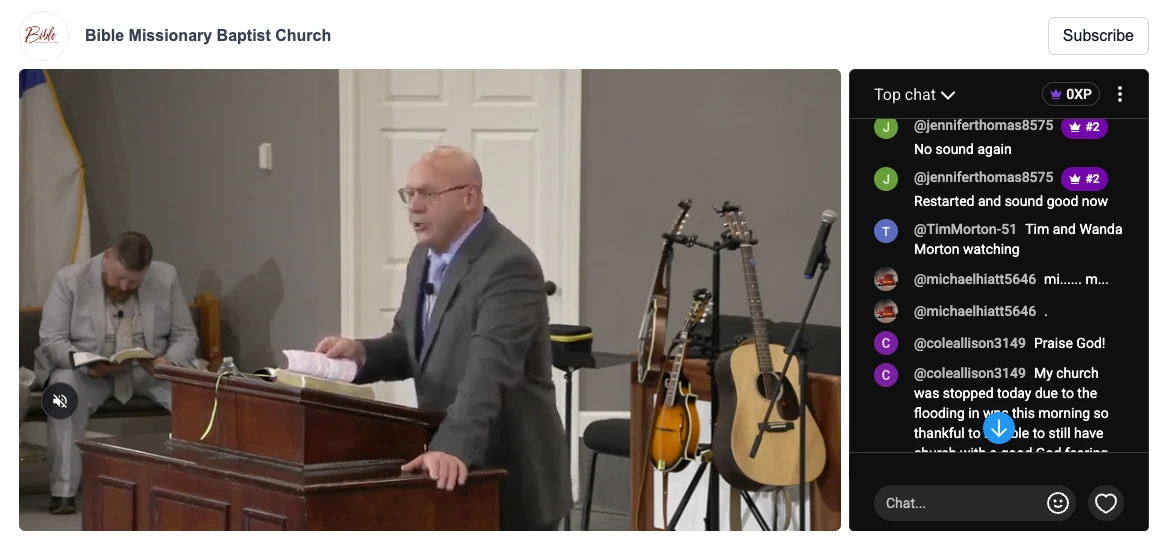
On your Live Page
Open the Live Page editor, find the "Live chat" section under the video settings, and switch on "Show live chat." That's it.
While you're live, a "Live Chat" tab with a pulsing red dot appears first in the panel beside the video and opens by itself the moment the stream starts, so the room is full before anyone looks for it. If a visitor had already clicked over to your schedule or links, we leave them where they are. When the stream ends, the tab goes away and the panel returns to your first section.
What's inside the tab is YouTube's own chat, the same messages, emoji, moderation and Super Chats your YouTube viewers see, in the same frame. We can't restyle the inside of it, but it does follow the visitor's light or dark setting, so it never looks pasted on.