October 7, 2026 / No. 3 / by Shawn North
Live chat, on your Live Page and beside your widget
The one thing people watching on Facebook or YouTube have that people watching on your website don't is each other. The chat. The "good morning from Ohio," the prayer request, the amen. From today, YouTube streams can bring it along.
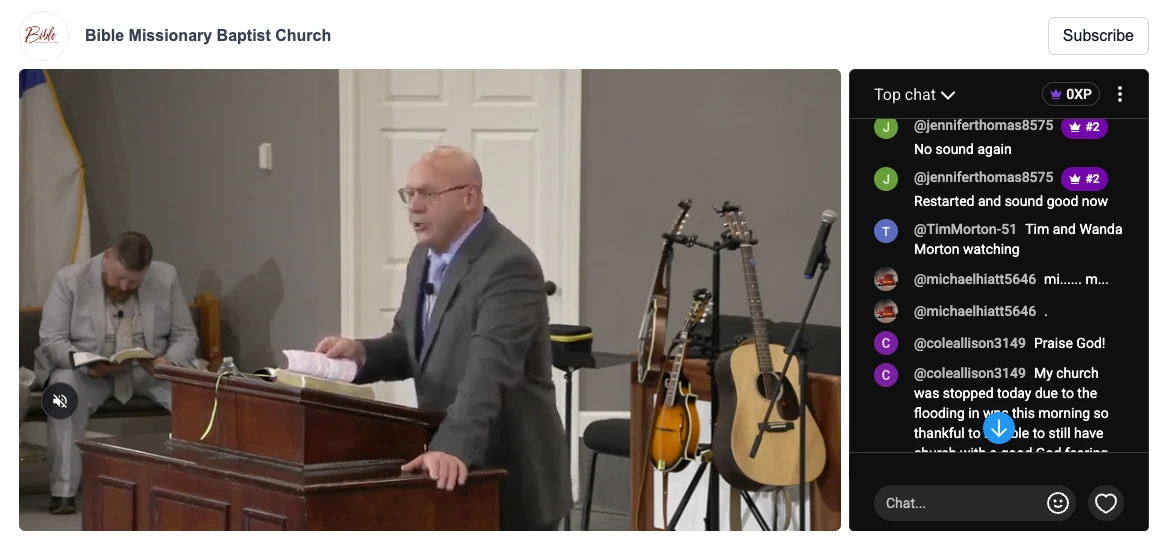
On your Live Page
Open the Live Page editor, find the "Live chat" section under the video settings, and switch on "Show live chat." That's it.
While you're live, a "Live Chat" tab with a pulsing red dot appears first in the panel beside the video and opens by itself the moment the stream starts, so the room is full before anyone looks for it. If a visitor had already clicked over to your schedule or links, we leave them where they are. When the stream ends, the tab goes away and the panel returns to your first section.
What's inside the tab is YouTube's own chat, the same messages, emoji, moderation and Super Chats your YouTube viewers see, in the same frame. We can't restyle the inside of it, but it does follow the visitor's light or dark setting, so it never looks pasted on.
Beside your widget
The same chat is available on the widget itself, for churches that keep the stream on their own site. In the widget editor, YouTube live widgets now have a "Live Chat" section with a "Show live chat" switch. It's off for everyone until you turn it on.
With it on, the chat appears as a column to the right of the player while you're live, exactly as tall as the video, and disappears when you're off the air.
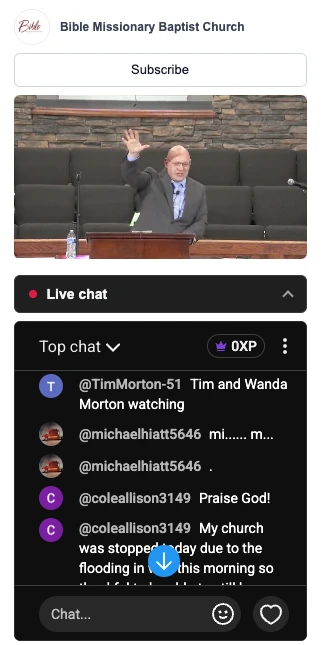
Under about 600 pixels of width, on phones and in narrow sidebars, it folds into a "Live chat" bar under the player instead. Tap the bar and the chat opens below the video; tap again and it folds away. The page never jumps when a stream starts. It works on Live and every Live+ layout.
The one honest caveat
Posting a message needs the viewer to be signed in to YouTube inside the chat frame. Chrome and Firefox usually allow that. Safari, and every browser on an iPhone, block it, so there the chat is read-only. Under the chat on both the page and the widget there's a small line: "Can't post here? Open the chat on YouTube," which opens the chat in its own window where anyone can join in.
This is YouTube only for now. Facebook doesn't offer an embeddable chat at all. Twitch does, and we'll add it if people ask.
Two smaller things that shipped with it
The Live Page's panel tabs no longer stack when you have several sections with longer names. They sit on one scrolling row with a small arrow at the edge, and section names are capped at 14 characters. The recent videos tab is now called "Videos" unless you rename it.
And the Live Page reacts faster. The widget now tells the page the moment it goes live or offline, so the header, the schedule strip and the chat tab flip together with the video instead of trailing it by up to 40 seconds. If you embed a live widget on your own site and want to react too, the widget fires an embedvidio:live event on the page with the widget id, the platform and the live state.